Permimeter V2 issue - Help !

patek

New member
Hello everyone,
I am trying to setup the perimeter function and I encounter some problems.
I have no oscilloscope and my PC has no audio input, so I can not monitor the signals.
plot.jpg

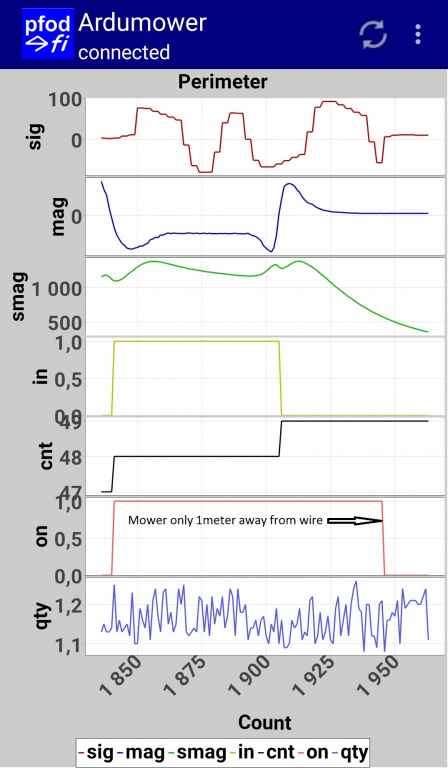
In the atached file is a screenshot of the perimeter plot (ADC calibration done, all motors and charger off) :
It seems to work, but the signal was apparently too weak and when I move the robot only one meter away from the wire, smag drops below 500 and the "ON" changes to 0.
I measured these values on the sender: 6.8V with 4ohms wire resistance -> 11.5w power. Perimeter led on on the sender board.
Thank you for giving me your opinion on this plot and helping me to solve this issue.
 
Ok, the label 'ON' is confusing here. Better would be 'ON and IN'.

You are not inside the perimeter loop, that's why it times out and then shows 'OFF'.

Please go inside your loop, and check again?
 
Looks like something is missing... for sure alexander can help better than me...
Maybe you have to check if all is done right
Either in sender than in receiver
 
Now, you have to decrease the threshold for a 'smag timeout' further:

pfodApp->Settings->Perimeter->Timed-out if below smag

Or

in file 'perimeter.cpp':

Perimeter::perimeter(){
...
timedOutIfBelowSmag = 300;


I will add that information to the Wiki.
 
oh - ist ON to be interpretated as "Mower directly over Perimeterwire"?

Hi Alexander,

when adding description about Parameter "timedOutIfBelowSmag", please also describe meaning of the other Perimeter Tracking Parameters changeable via PfodApp. This would be very helpful!

Many Thanks!!!

Peter
 
Ok there is something I forgot:
Alessio asked whether current software version is supporting one or two perimeter sensors. Connectors are given for peri left and right. But will Azurit automatically recognize the on or two connected peri sensors and use them in calculations?
 
Here are the settings shown in one image: http://wiki.ardumower.de/index.php?title=Ardumower_PCB#Settings
Also, have a look at the file 'mega.cpp' (below the pin descriptions) which lists each setting with some text/comment.

Azurit only uses and reads 'pinPerimeterLeft' as the center coil.

For the pfodApp perimeter plots, you can find the description here:
http://wiki.ardumower.de/index.php?title=Perimeter_wire#Receiver_diagnostics.2Ftroubleshooting
 
Alexander, could you please add information for the following parameters to the wiki. Or are there any explanations I did not find?

Thanks.

Peter

perimeterTriggerTimeout = 0; // perimeter trigger timeout when escaping from inside (ms)
guessed meaning: amount of ms after escaping from inside trigger will be set (what to do?)???

perimeterOutRollTimeMax = 2000; // roll time max after perimeter out (ms)
perimeterOutRollTimeMin = 750; // roll time min after perimeter out (ms)
guessed meaning: between ...TimeMin and ...TimeMax after state "outside perimeter" has been detected mower is turning round???

perimeterOutRevTime = 2200; // reverse time after perimeter out (ms)
guessed meaning: for ...RevTime mower will drive backwrds after having detected to be out of perimeter???

perimeterTrackRollTime = 1500; //roll time during perimeter tracking
guessed meaning: no idea

perimeterTrackRevTime = 2200; // reverse time during perimeter tracking
guessed meaning: no idea

trackingPerimeterTransitionTimeOut = 2000;
guessed meaning: no idea

trackingErrorTimeOut = 10000;
guessed meaning: no idea

trackingBlockInnerWheelWhilePerimeterStruggling = 1;
guessed meaning: blocking of inner wheel related to direction of curve to steer???
 
AlexanderG schrieb:
Now, you have to decrease the threshold for a 'smag timeout' further:

pfodApp->Settings->Perimeter->Timed-out if below smag

Thanks Alexander, I set the treshold to 100 and it worked, I could make my first kitchen test in automatic mode without any perimeter error :)

.. but still, I think my signal seems very weak. I'll make garden test next weekend and will keep you informed about the evolution of testings.

Thanks Again.

PS: As Peter said, a few things need to be detailed in the wiki for a better understanding and quicker setup.
 
Zuletzt bearbeitet von einem Moderator:
well... i will save time then... and go on working to obtain better smooth perimeter signal and detection.
i just noticed i was missing the slew jumper in sender driver and poti setup in receiver amplifier :pinch:

thank you all!!!
Alessio
 
SORRY ALEX,

Ifound all explanations I asked for in the wiki as ju described with the link some post ago!

Thanks a lot!!!

Peter
 
Hi all,
I added some details in the wiki here for a better understanding.

I made my first garden test today :) and I have two issues :unsure: :

1- when asking the mower to return home, it goes straight on until it finds the perimeter wire (as expected) but immediately starts to turn round on itself. I have not managed to solve the problem, even by varying the parameters. (Transition timeout set to max).

2- As I expected, the signal received with the coil is very weak, I had to decrease the "Timed-out if below smag" value down to 20 to make it work when mower in the middle of the garden (around 10meters away from wire)

Thank you for sharing me your ideas on this issue, any tips welcome, thanks.
 
Any chance to get a screenshot of the serial console output (CTRL+SHIFT+M) to understand the states the robot is going into?
http://wiki.ardumower.de/images/f/ff/Ardumower_states.png http://wiki.ardumower.de/index.php?title=Ardumower_PCB#Diagnostics.2Ftroubleshooting

A plot of 'pfodApp->plot->sensor counters' will be helpful too to find out if any sensor triggers. That maybe could explain the turning.
 
As far as I remember, the PFOD app showed PFND and then PTRK just before starting turning around.

I'll try to get a copy of the console output tomorrow if it stops raining (I live in brittany :p )

Alex, I made a mistake on the default setting value on the wiki page at this line and for some reason I can't edit it anymore. Can you grant me access or set the right value?

pfodApp->Options->Perimeter->"Use differential signal" (useDifferentialPerimeterSignal) - default setting:0.8 | Use differential signal (see signal section)
 
Then it's actually tracking the perimeter (PTRK) - your motor speed is probably too high. Reducing the motor speed could help.

http://wiki.ardumower.de/images/7/76/Speedcontrol.png
 
i got same trouble...
at first time perimeter sender/receiver had not a good setup
solved it i got better tracking but not else good...
it was rolling like it were evaluating the right position on perimeter...
at last i putted receiver (coil and amplifier) out the case right up the bumper's holes
and now it is working very well
my ardumower is not just going straight to perimeter when searching
it goes a meter and then rolls... the goes to max signal direction and aft another
meter rolls again and so on till reaching the wire... then rolls again and at last goes
following perimeter
 
Thanks for your help. Here is the console output:

pfod cmd=r
t 28 l3399 v2 OFF sig min -13 max 27 avg 6 mag -427 qty 156 in 1 cnt 8 on 1
t 29 l2891 v2 OFF sig min -13 max 27 avg 6 mag -419 qty 154 in 1 cnt 8 on 1
pfod cmd=rh
t 0 l3332 v2 PFND sig min -13 max 27 avg 6 mag -440 qty 166 in 1 cnt 8 on 1
t 0 l3332 v2 PFND sig min -13 max 27 avg 6 mag -409 qty 149 in 1 cnt 8 on 1
t 1 l2775 v2 PFND sig min -13 max 27 avg 6 mag -431 qty 160 in 1 cnt 8 on 1
t 2 l2894 v2 PFND sig min -13 max 27 avg 6 mag -439 qty 165 in 1 cnt 8 on 1
t 3 l2892 v2 PFND sig min -13 max 27 avg 6 mag -431 qty 162 in 1 cnt 8 on 1
t 4 l2888 v2 PFND sig min -13 max 27 avg 6 mag -469 qty 158 in 1 cnt 8 on 1
pfod cmd=r
t 5 l2884 v2 PFND sig min -13 max 27 avg 6 mag -741 qty 149 in 1 cnt 8 on 1
t 6 l2496 v2 PFND sig min -13 max 27 avg 6 mag -1878 qty 149 in 1 cnt 8 on 1
t 7 l2919 v2 PFND sig min -13 max 27 avg 6 mag 1056 qty 162 in 0 cnt 9 on 1
t 8 l2419 v2 PFND sig min -34 max 51 avg 6 mag 885 qty 167 in 0 cnt 9 on 1
t 9 l2182 v2 PFND sig min -34 max 51 avg 6 mag -1428 qty 166 in 0 cnt 9 on 1
t 0 l2192 v2 PTRK sig min -34 max 51 avg 6 mag -1713 qty 165 in 1 cnt 10 on 1
t 0 l2192 v2 PTRK sig min -34 max 51 avg 6 mag -812 qty 160 in 1 cnt 10 on 1
pfod cmd=r
t 1 l3143 v2 PTRK sig min -34 max 51 avg 6 mag -1646 qty 163 in 1 cnt 10 on 1
t 2 l3012 v2 PTRK sig min -34 max 51 avg 6 mag 814 qty 165 in 0 cnt 11 on 1
t 3 l3281 v2 PTRK sig min -28 max 43 avg 6 mag 620 qty 149 in 0 cnt 11 on 1
t 4 l3295 v2 PTRK sig min -28 max 43 avg 6 mag 1661 qty 160 in 0 cnt 11 on 1
t 5 l3275 v2 PTRK sig min -28 max 43 avg 6 mag -1050 qty 164 in 1 cnt 12 on 1
pfod cmd=r
t 6 l3273 v2 PTRK sig min -28 max 43 avg 6 mag -1737 qty 151 in 1 cnt 12 on 1
t 7 l2858 v2 PTRK sig min -28 max 43 avg 6 mag 635 qty 157 in 0 cnt 13 on 1
pfod cmd=ro
loadSaveRobotStats: write
loadSaveRobotStats addrstop=822
t 0 l3295 v2 OFF sig min -28 max 43 avg 6 mag 430 qty 149 in 0 cnt 13 on 1
t 0 l3295 v2 OFF sig min -28 max 43 avg 6 mag 507 qty 158 in 0 cnt 13 on 1
t 1 l3076 v2 OFF sig min -24 max 39 avg 6 mag 690 qty 150 in 0 cnt 13 on 1
t 2 l3312 v2 OFF sig min -24 max 39 avg 6 mag 788 qty 191 in 0 cnt 13 on 1


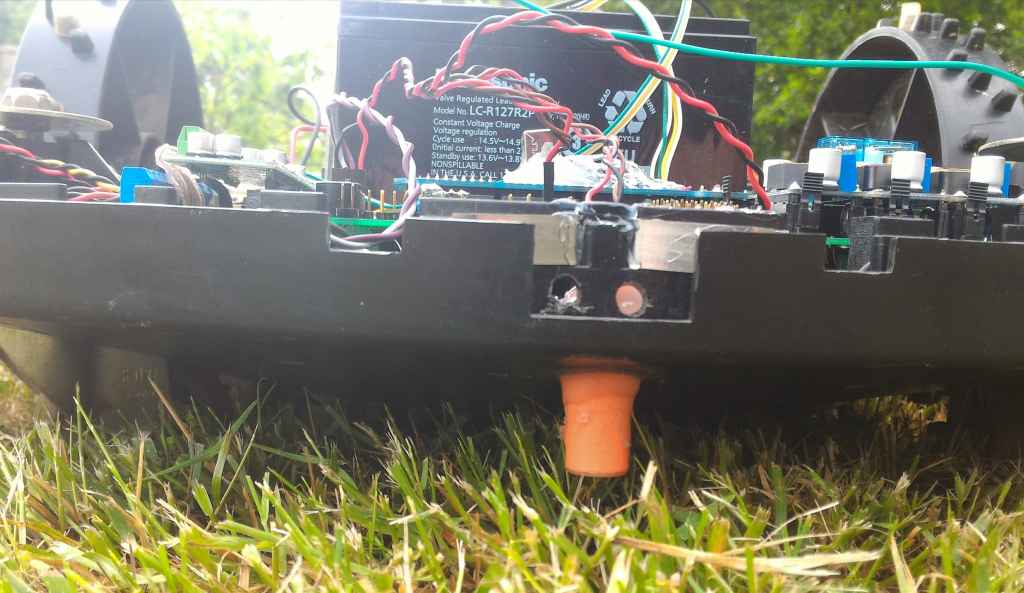
My coil can't be closer to the ground and is in the very front of the mower:


coil.jpg


.. and here is a video showing how the mower behaves when has found the perimeter wire:

[video width=425 height=344 type=youtube]lrftjMJ74pE[/video]

I'll play with speed and accel settings and will keep you informed
Attachment: https://forum.ardumower.de/data/media/kunena/attachments/1435/coil.jpg/
 
Zuletzt bearbeitet von einem Moderator:
Yes, the problem seems that the default tracking settings is for the Ardumower motors which behave different (acceleration etc.)

Try to play with the tracking PID parameters in Settings->Perimeter->Track P,I,D.

Some info about PID:
http://wiki.ardumower.de/index.php?title=PID_control
 
Oben