Adafruit hat keine 3.3v mehr

Does it blow if you connect the JYQD to one of the gear sockets intead of the mow one?

Im basically wondering if the BL adapter is toast, no idea why it would only pop the fuse when the driver is connected though.
 
Der Mosfet q2 brennt bei zu hohem Strom durch. Ich hatte mal einen mähmotor mit windungsschluss. Da hat der sich alleine ausgelötet, war aber noch ganz. Der packt schon einen hohen Strom, aber entweder ein zu hoher startstrom (Elkos laden) oder ein Kurzschluss im 28V Bereich (motortreiber?, evtl. eine lose Schraube oder ein loses Kabel). Schau auch mal unter dem BL-Adapter nach.
 
Does it blow if you connect the JYQD to one of the gear sockets intead of the mow one?
No, I haven't tested that. What is the effect supposed to be?
I ment your wiring from Adapter to JYQD
yes, I did'nt change anything between propper work and blowing fuse.
Schau auch mal unter dem BL-Adapter nach.
Das gucke ich mir an. Das kann passiert sein. Der Treiber war vorher frei fliegend montiert. Jetzt habe ich ihn auf einen gedruckten Adapter geschraubt. Vielleicht hat sich dabei ja etwas gelöst.
 
No, I haven't tested that. What is the effect supposed to be?
To rule out the BL adapter, if it blows on some sockets and not others then that would probably mean there is something dead in the adapter.
I dont know if you have checked without a motor attached to the driver but thats another variable worth testing in case there is something wrong with the motor even if it runs on a lab power supply.
 
I've finally got around to working through your suggestions again. To avoid damage, I now always run the PCB on the laboratory power supply and limit the current to 5A at 24V. The following findings can be reported:
  • Without adapter, driver and motor -> no problems, M4 starts up. Power approx. 3W
  • With adapter, without driver and motor -> no problems, M4 starts up. Power approx. 3W
  • With adapter and driver, without motor -> voltage drops to 3V. 15W are drawn.
  • Driver connected to the other positions -> no change.
  • With adapter, driver and motor ->no change.
  • Connecting different drivers -> no change.
  • Connecting a different apapter -> no change.
Does anyone have any idea what could be causing this?
 
Hast du auch mal nur einen Treiber nach dem anderen dran gehängt? Um eventuell einen defekten Treiber heraus zu filtern? So pauschal hört sich das stark nach einem defekten Treiber an.
 
I found the error!
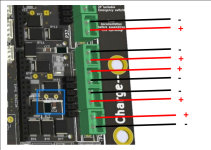
When supplying the BL drivers, +/- are swapped. To be honest: a really stupid idea!
1717435601479.png
I probably hit the RPI port when plugging in the drivers.
Later, when testing, I didn't realize that the connections were swapped and connected incorrectly...
 
Jetzt läuft der Recher wieder hoch, schmeißt aber folgende Fehler
01:00:45:960 - Error: motor driver left signaled fault
01:00:45:960 - Error: motor driver right signaled fault
01:00:45:160 - ERROR motor overload (average current too high) - duration=16000 avg current amps (left,right,mow)=6.16,6.20,6.24
Woran kann das jetzt liegen? Das Labornetzteil zeigt 7W an.
 
Die Strommessung läuft auf dem BL Adapter. Alle Ströme LR Mow zeigen über 6A… sieht für mich nach einem Defekt auf dem BL Adapter
 
Beim zusammenbauen wäre mir das auch fast passiert, da gab es dann diesen seltsamen Moment... Moment mal, was ist das? Ist die Belegung nicht gleich?? Tatsächlich.. um ein Haar hätte ich ursprünglich auch verpolt in Betrieb genommen....
 
soo, jetzt dreht sich wieder alles, wie es soll. Die ZS-X11D1 habe ich, wie von euch empfohlen, mit Kühlkörper eingebaut. Drehrichtung musste ich bei beiden Treibern umkehren. Was mich allerdings wundert, ist, dass ich in der config.h den MOTOR_DRIVER_BRUSHLESS auswählen muss und nicht den MOTOR_DRIVER_BRUSHLESS_GEARS_JYQD. Wenn ich den MOTOR_DRIVER_BRUSHLESS_GEARS_JYQD wähle, dann bekomme ich
ERROR motor current too high: current=6.23,6.31,6.29
Mit dem MOTOR_DRIVER_BRUSHLESS ist dagegen alles gut. Ist das bei euch auch so?
 
Müssen nicht beide Sachen aktiviert sein?

Code:
// for brushless motors, study the sections (drivers, adapter, protection etc.) in the Wiki (https://wiki.ardumower.de/index.php?title=DIY_Brushless_Driver_Board)
#define MOTOR_DRIVER_BRUSHLESS   1     // uncomment this for new brushless motor drivers
//#define MOTOR_DRIVER_BRUSHLESS_MOW_DRV8308  1 // uncomment for brushless DRV8308 driver and mowing motor
//#define MOTOR_DRIVER_BRUSHLESS_MOW_A4931  1    // uncomment for brushless A3931 driver and mowing motor
//#define MOTOR_DRIVER_BRUSHLESS_MOW_BLDC8015A 1  // uncomment for brushless BLDC8015A driver and mowing motor
#define MOTOR_DRIVER_BRUSHLESS_MOW_JYQD 1  // uncomment for brushless JYQD driver and mowing motor (https://forum.ardumower.de/threads/jyqd-treiber-und-sunray.24811/)
//#define MOTOR_DRIVER_BRUSHLESS_MOW_OWL 1  // uncomment for brushless owlDrive mowing motor
#define MOTOR_DRIVER_BRUSHLESS_GEARS_DRV8308  1   // uncomment for brushless DRV8308 driver and gear/traction motors
//#define MOTOR_DRIVER_BRUSHLESS_GEARS_A4931  1    // uncomment for brushless A4931 driver and gear/traction motors
//#define MOTOR_DRIVER_BRUSHLESS_GEARS_BLDC8015A 1   // uncomment for brushless BLDC8015A driver and gear/traction motors
//#define MOTOR_DRIVER_BRUSHLESS_GEARS_JYQD 1   // uncomment for brushless JYQD driver and gears/traction motor
//#define MOTOR_DRIVER_BRUSHLESS_GEARS_OWL 1   // uncomment for brushless owlDrive gears/traction motor

Ich habe da auch mal probleme gehabt, .. das erste #define für MOTOR_DRIVER_BRUSHLESS sollte bei bürstenlosen Treibern unabhängig von deiner auswahl später auch aktiviert sein? Ansonsten nimmt er den generischen bzw. custom in der amrobotdriver.cpp wenn du nichts ausgewählt hast aber 'define MOTOR_DRIVER_BRUSHLESS = true
 
Zuletzt bearbeitet:
Oben